
Table of Contents
1. The Rendering Engine Revolution: Why 2026 is Different
For years, cross-platform frameworks were criticised for a subtle visual "uncanny valley" — animations that felt slightly off, gesture responses that lagged imperceptibly, and UI components that didn't quite match platform conventions. That era is over. Flutter's Impeller engine — the replacement for the legacy Skia renderer — delivers a consistent 60–120 FPS with pre-compiled shaders that eliminate the "jank on first frame" problem that plagued earlier Flutter versions.
React Native's New Architecture achieves native-level touch responsiveness by moving gesture handling off the JavaScript thread entirely. The result: both frameworks can now produce experiences that are perceptually indistinguishable from native for all standard interaction patterns.
2. Platform Conventions: The Real Secret to a Native Feel
The most common mistake cross-platform teams make is not a framework limitation — it is ignoring platform-specific UX conventions. iOS users expect swipe-back navigation, bottom sheet modals, and SF Symbols iconography. Android users expect Material You dynamic theming, back button handling via the OS gesture system, and edge-to-edge display support.
A cross-platform app that uses identical UI patterns on both platforms will feel "off" to users of both platforms — not because of the framework, but because of the design decisions. Implementing platform-adaptive components — either via Flutter's Platform.isIOS conditionals or React Native's Platform.select() API — is the single highest-impact practice for achieving a genuinely native feel.
3. Performance Tuning Specifics
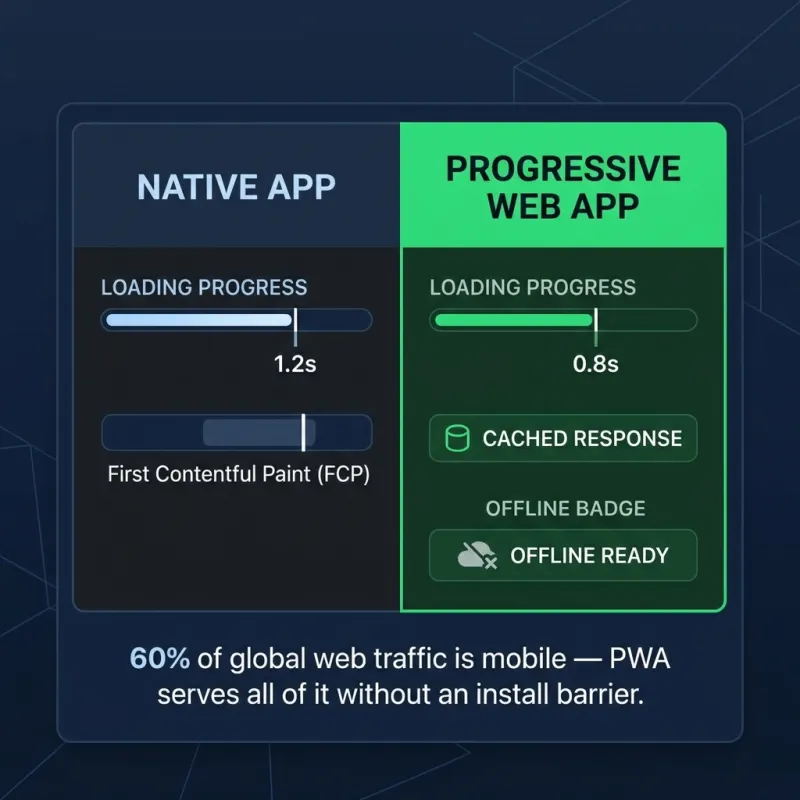
With mobile accounting for 60% of all global web traffic, performance on mid-range devices — not flagship phones — is the correct benchmark for a native-feel experience. The standard development trap is building on a MacBook simulator or a top-tier physical device, where all frameworks feel silky smooth. Test on a 3-year-old mid-range Android device to expose the real performance characteristics of your render pipeline.
Key optimisations: lazy-load off-screen list items using ListView.builder (Flutter) or FlatList (React Native) rather than rendering full lists in memory. Cache network images aggressively using cached_network_image or react-native-fast-image. Profile memory usage in release mode, not debug mode — debug builds have 2–3x higher memory overhead that can mask real production performance issues.
4. When to Bridge to Native Code
Cross-platform frameworks handle 90%+ of typical app requirements natively. For the remaining 10% — hardware integrations like custom camera pipelines, Bluetooth LE communication, or biometric payment flows — both Flutter and React Native provide clean native bridge architectures that allow platform-specific Swift/Kotlin code to be called from the shared codebase without architectural compromise.
The hybrid approach is the professional standard: build the UI layer cross-platform for efficiency and consistency, and write native modules only for the platform-specific capabilities that genuinely require it. Our mobile development team is experienced in exactly this architecture. See our PWA vs Native guide for a related comparison on web-based mobile strategies.
Transform your business today.
Reach out to our experts and discover how custom software can accelerate your growth.


